If you’ve been doing web development for a while, chances are you rely on React to build your frontends. You ship a solid web app. It works well. Users like it and you realise it needs a mobile app.
You start researching and hit a wall, you need Kotlin for Android and Swift for iOS. You start questioning yourself: Do I really need to learn two separate languages? Master completely different tooling? Maintain two isolated codebases?
It sounds like an absolute nightmare. But just as you’re about to give up, you stumble into the territory of cross-platform development and discover React Native. It’s a framework that lets you write mobile apps using JavaScript and React, tools you already know and with a single codebase that targets both Android and iOS natively.
Suddenly, building mobile apps doesn’t feel like starting from zero. It feels like an extension of what you already know. In this article, we are going to tear down React Native and understand exactly how its architecture works.
What is React Native
React Native is an open-source framework that allows developer to build native mobile applications for multiple platforms (Android, iOS, Mac, Windows) using JavaScript programming language and React library.
Unlike hybrid frameworks that render inside a WebView (essentially embedding a browser inside a mobile app), React Native renders real, platform-specific native components.
Let’s take this code:
<View>
  <Text>Hello World</Text>
</View>
The above code does not translate into the HTML. Rather it’s actually converted into the Native component of the specified platforms.
-
Viewwill get converted to theViewGroupcomponent on Android andUIViewon iOS, which are just native components, which acts as the layout containers, holding other components. -
Textwill get converted to theTextViewcomponent on Android andUITextViewon iOS, which are again the native components, used to render the text on the screens.
They are the same building blocks you would use if you were writing the app directly in Kotlin or Swift. This means apps feel more like they belong on the device they’re running on, offering a smoother and more responsive user experience.
How React Adapts to Web and Mobile
You might wonder how React, commonly used to build website front-ends, can also render native components for mobile operating systems. Is it really the same React used for the web?
Yes and no. The core React library is consistent across both web and mobile ecosystems, but the difference lies in how components are rendered.
Have a look at the diagram below:
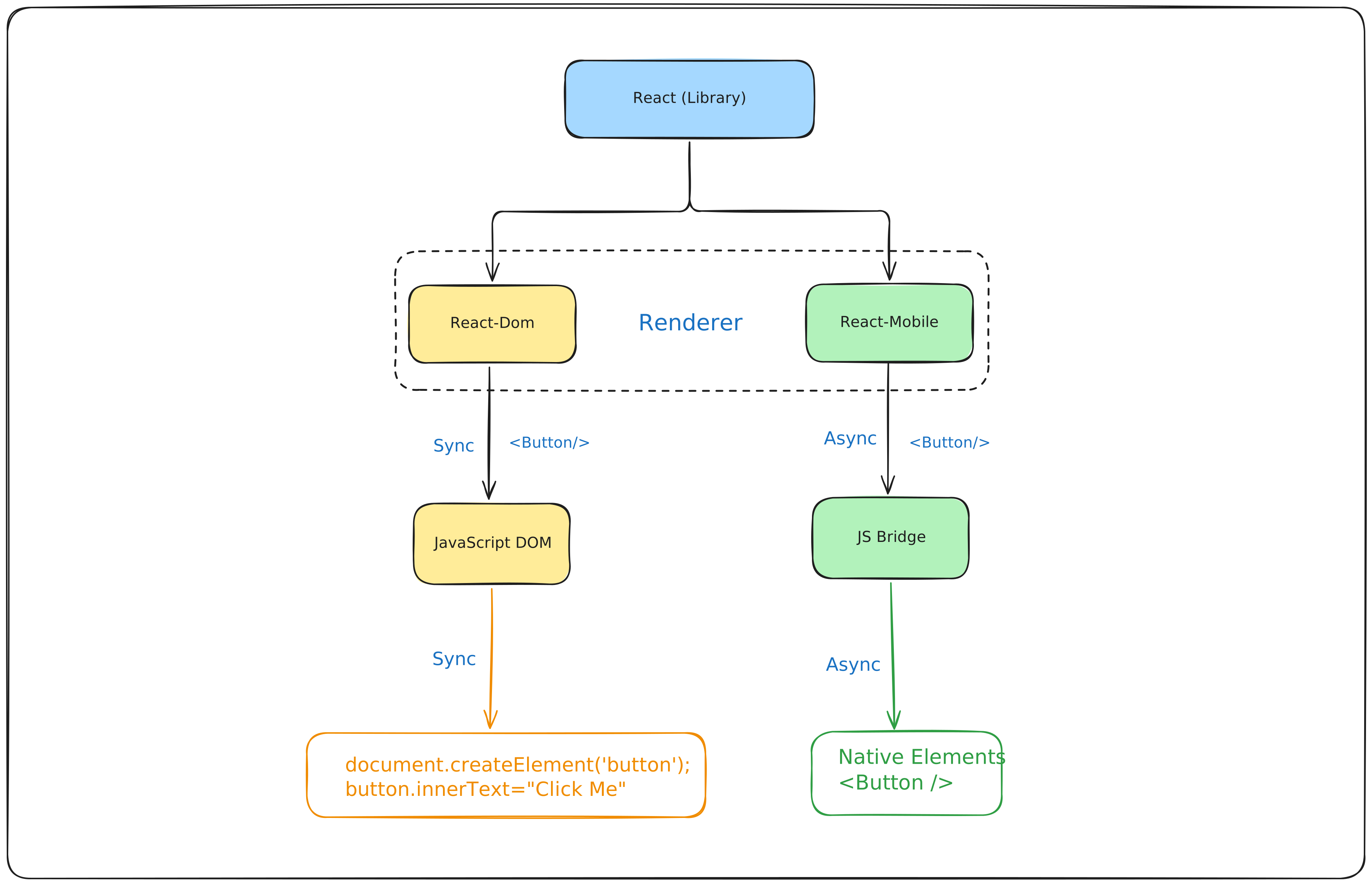
To understand React Native, you need to understand a surprising truth i.e . React doesn’t know how to render an UI on the Screen.
Look at the diagram above. At the very top sits the React Library. This is the brain of the operation. The function of the core react library is to manage the state using hooks such as useState and useEffect and calculates which part of the UI needs to be updated based on data changes using a process called Reconciliation. React library itself doesn’t know what a HTML div is or what an android ViewGroup is.
That job of rendering the UI is done by the Renderer.
This architecture is what allows React to exist anywhere. You keep the same React Core at the top, but you swap out the Renderer depending on which platform you are targeting.
-
React-DOM Renderer: When building for the web, we use a renderer called
react-dom. Since browsers natively understand JavaScript, the process is straightforward and synchronous in nature. Thereact-domtakes the blueprint from the react core and directly manipulates the DOM on the browser. -
React-Native Renderer: Since Mobile platforms like Android & iOS doesn’t understand the JavaScript natively, we require a different renderer known as
react-nativewhich takes the blueprint from react core and send it across theJS Bridge (old arch)asynchronously, which tells the mobile OS, to render the native component with specific properties (like color, size etc).
React does not render anything by itself. The renderer determines whether your components become DOM nodes or native UI views.
Now, we have a solid introduction of React Native, it’s time to go behind the scenes with the architecture.
JS Bridge Architecture
The Bridge Architecture, also known as the Legacy Architecture, was how React Native applications originally worked. This was the default architecture before React Native v0.76.
Let’s understand how the old architecture used to work.
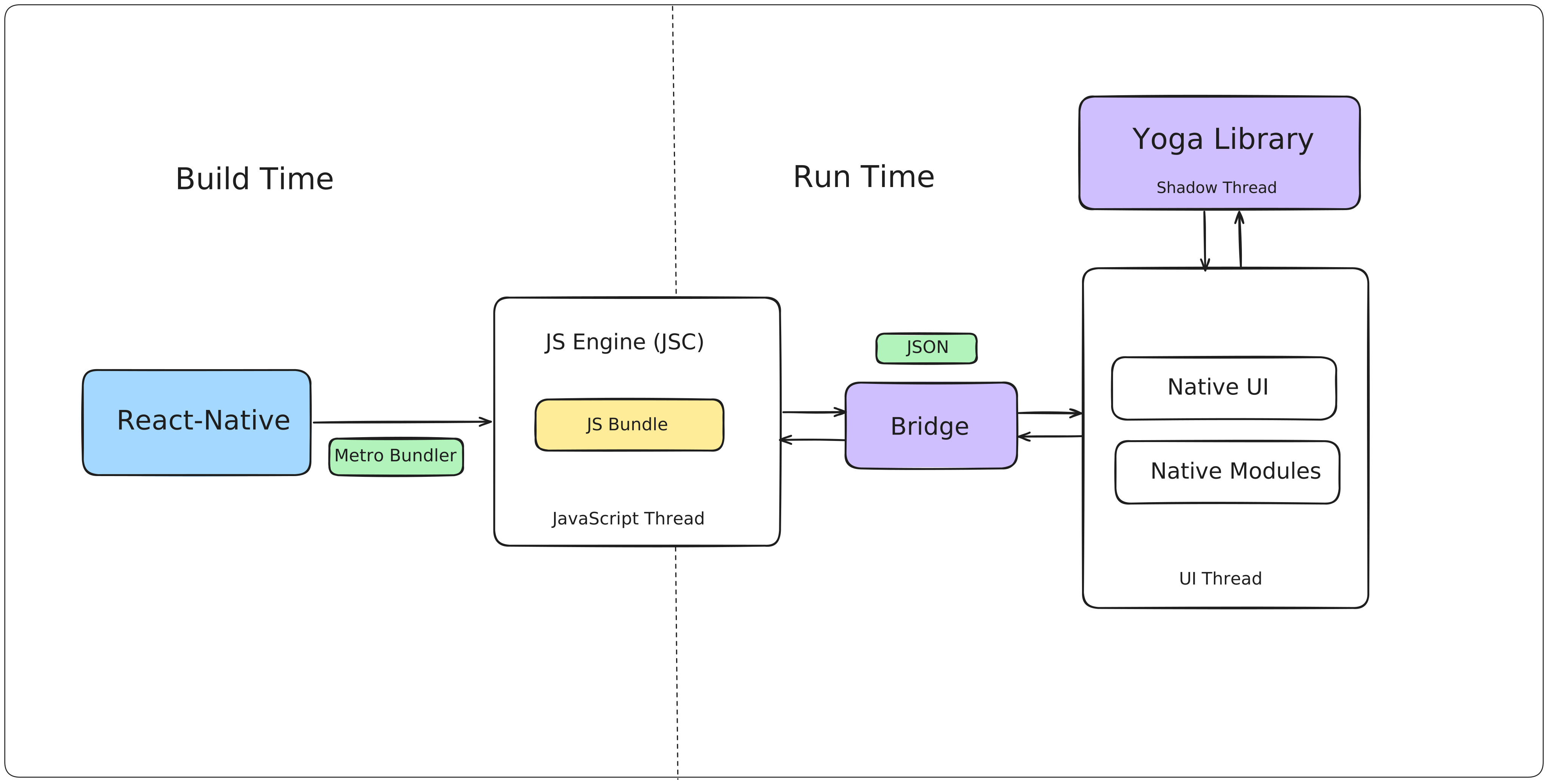
Phase 1: Build Time (The Setup)
-
In the build phase, all the JavaScript code, react components, assets are taken from our codebase and are bundled into a single optimised file known as JS Bundle using the Metro Bundler.
-
This static bundle is the blueprint of your entire application and is embedded with your application during the build time.
-
Once the app is installed, Metro is no longer involved. Everything from this point forward happens at runtime.
Phase 2: Run Time (The Execution)
When the user taps on your app, three different threads are fired for execution of our app:
-
JavaScript Thread: The JavaScript Engine (JSC) would boot up and start executing the JS Bundle which is embedded in our app. This is where our JavaScript code will be executed and holds all the react logic, state and performs the API calls as well to fetch the data.
-
UI Thread: The UI thread will spawn on your mobile OS, which will allow it to paint the initial UI of the app for the interaction based on the instructions it received.
-
Shadow Thread: This thread will be used by the Yoga Library, that will calculate the entire layout of the app and provides the instructions to the UI Thread on how to render the layout.
Phase 3: Execution Phase
-
Whenever a user taps on the button, let’s say this button will change the colour of the background, then firstly the UI Thread will capture the Tap event on the button.
-
Since the Native UI cannot execute a JavaScript function directly, it will serialize the touch event into a JSON and will send this even to the asynchronous bridge.
-
The JS Bridge will sent this information to the JavaScript engine (JSC), which will deserialize the JSON, process the JavaScript code, let’s say update the state using
useStateand React calculates the new UI based on the changes. -
The JS Thread now serializes these instructions in the JSON format and will again send it to the asynchronous bridge.
-
The Shadow Thread will receive this JSON, and the Yoga library will read these instructions and will calculate exact coordinates and properties of the element and will pass it to the UI Thread to finally paint the updated screen.
Limitations of the Asynchronous Bridge
There were a few limitations of the asynchronous bridge but the biggest ones were the bridge and the JSON, as you can see from the diagram above.
-
Serialization Bottleneck: Since mobile platforms and JavaScript cannot directly communicate, they rely on JSON for interaction. Stringifying and parsing JSON costs CPU cycles. This serialization and deserialization process through the asynchronous bridge introduces significant latency, and handling a large number of events can lead to lag and frame drops on the native side.
-
Asynchronous Bridge: The serialization and deserialization process isn’t inherently problematic, but the issue arose from relying on a single asynchronous bridge. Because JavaScript cannot directly interact with the native side to modify the UI, each event must pass through the entire message-passing phase on the bridge. With a large volume of JSON messages, the bridge often becomes congested, leading to frame drops, laggy animations, and the notorious blank white screens when rendering lists.
-
Single JavaScript Thread: All code processing must occur on the JavaScript Thread. Although there are separate threads, such as UI Threads, the majority of application logic is managed by the JavaScript thread. Consequently, intensive computations can block this thread, leading to noticeable performance declines across the entire app.
Since, React Native doesn’t block the Main Thread, that’s why everything needs to be done in asynchronous way. Hence every event becomes a promise/callback.
New Architecture
The React Native core team soon understood that optimizing the JSON Bridge wouldn’t lead to the desired performance improvements. Therefore, they chose to eliminate the asynchronous JS Bridge altogether.
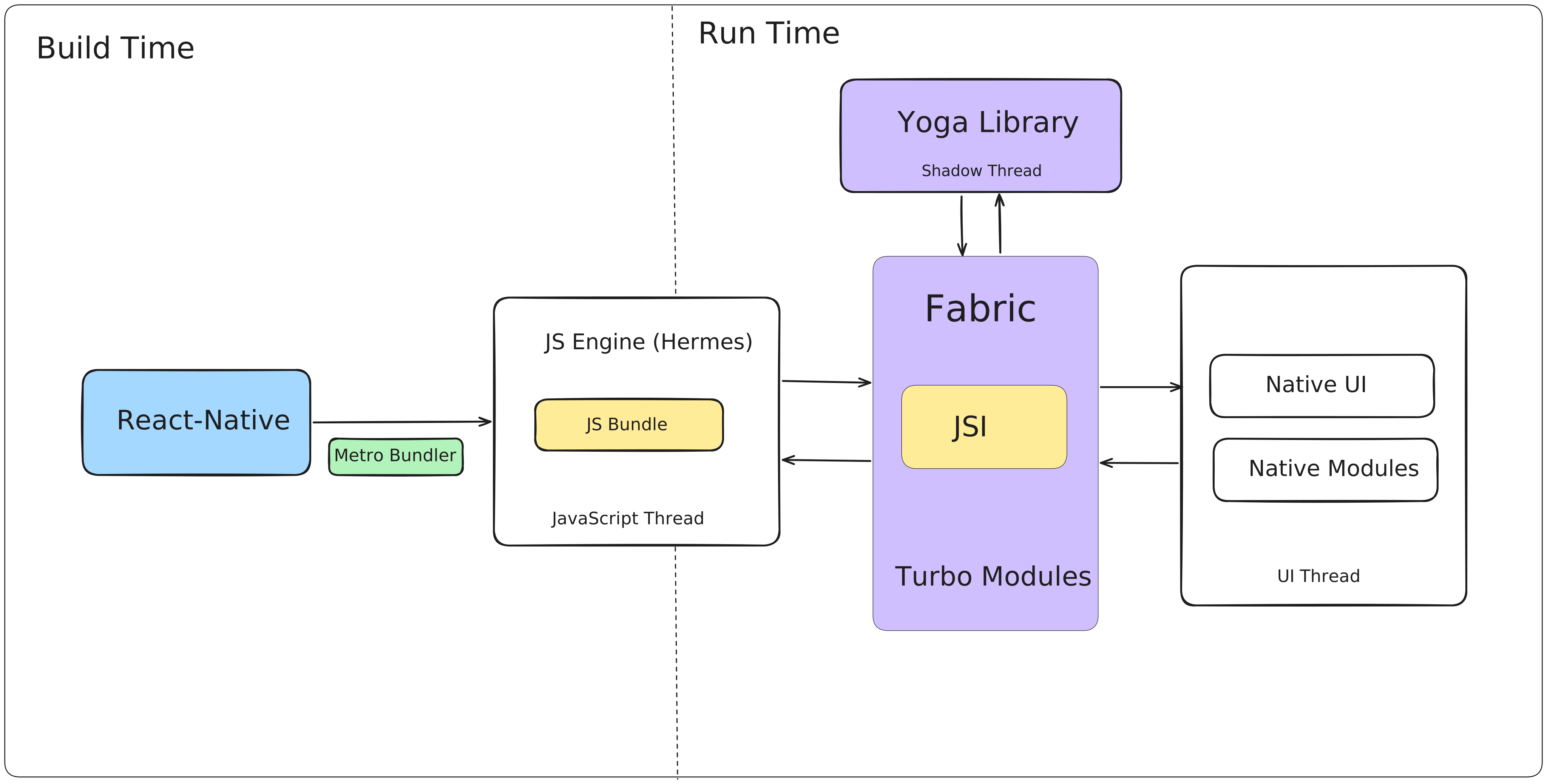
The bridge has now been replaced with the JavaScript Interface (JSI), featuring C++ bindings that directly call the native API of mobile platforms, bypassing the serialization/deserialization and message-passing process. This enhances the overall app performance.
Hermes Engine
-
Hermes Engine is an open source JavaScript engine created by Meta for improving the performance of the React Native apps.
-
It is heavily optimized for the React Native and uses JSI to directly communicate with the native platforms using Native APIs.
-
It provides other benefits like Improved time to interactive (TTI), smaller app bundle size and reduced memory consumption.
-
It replaced the old JSC and became the default for React native apps starting from version 0.70 of RN.
JavaScript Interface (JSI)
-
JavaScript Interface (JSI) is the new lightweight C++ layer that allows the JavaScript to directly communicate with the Native code.
-
JSI replaced the old legacy bridge architecture which means that no message passing or asynchronous operations are required.
-
JSI allows JavaScript to hold the references to C++ host objects and invoke methods directly on them in a synchronous manner.
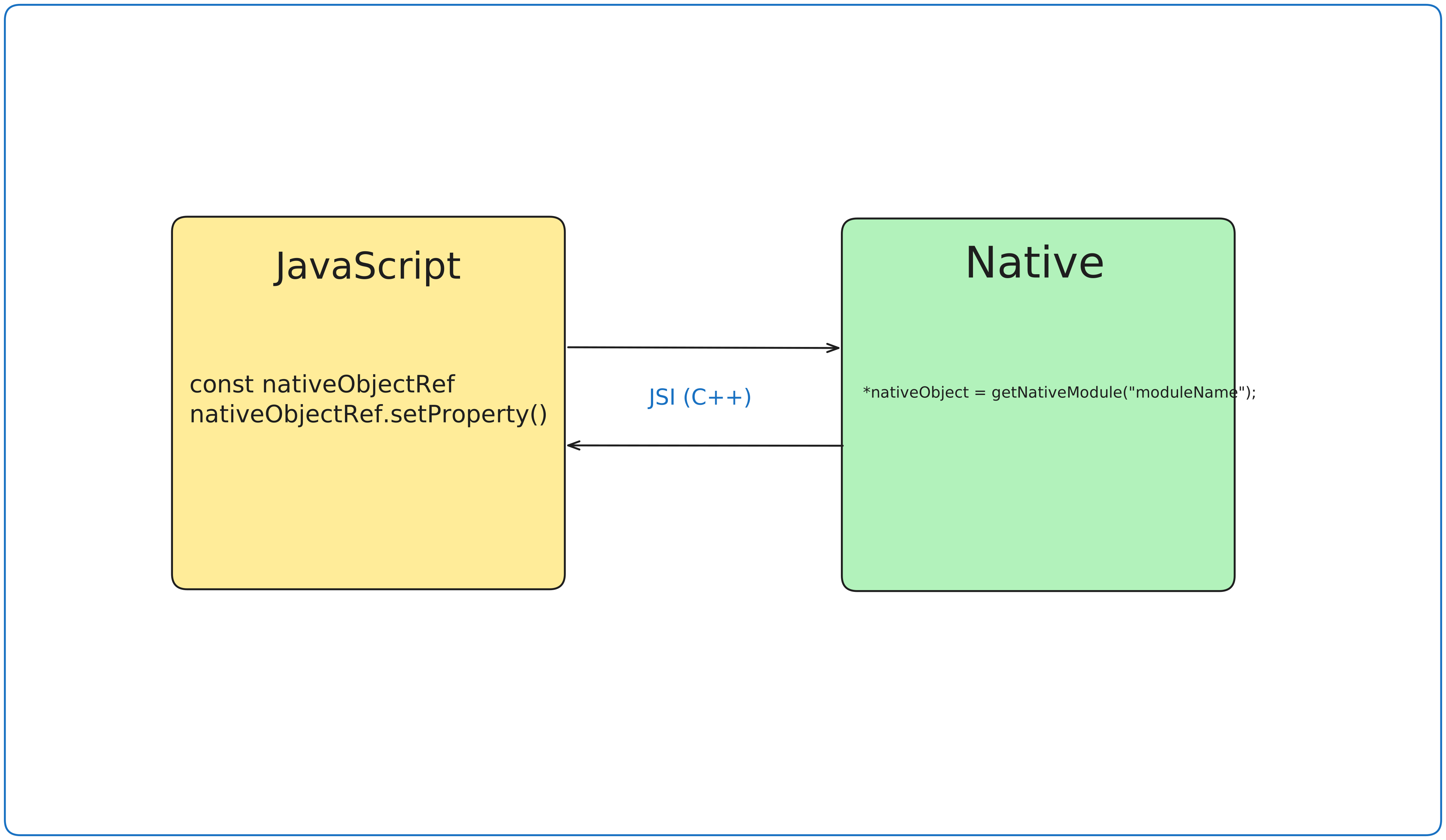
Because of JSI, JavaScript can now hold direct references to C++ Host Objects e.g. nativeObjectRef. When JavaScript calls nativeObjectRef.setProperty(), it isn’t sending a JSON message to a queue; it is synchronously invoking a method on the C++ object located in the native side.
Turbo Modules
-
In legacy architecture, if you need to use some native functionality such as Bluetooth, camera etc, then those native modules were loaded eagerly, on the startup and stayed loaded in the memory in case they were needed later.
-
Due to these reasons, in legacy architecture the native modules would take more time to load, significantly increase the memory footprint and makes the app slow.
-
However with introduction to Turbo Modules in the new architecture, now these modules are lazily loaded.
-
As turbo modules are loaded only when they are required, this allowed to reduce the memory footprint and also enhances the performance a lot.
Fabric System
-
Fabric is the new rendering system which utilizes the JSI and Yoga library to manage the UI on the native side.
-
In the legacy architecture, if JavaScript wanted to render a massive list, it had to serialize a huge JSON payload, dump it into the queue, and hope the UI thread wouldn’t drop frames. It was asynchronous in nature.
-
With Fabric, JavaScript uses JSI to directly invoke the C++ methods that create and update the native views (like UIView on iOS or ViewGroup on Android) synchronously.
-
Fabric render pipeline have multiple phases:
-
Render Phase: React executed the code and create a React Element tree which is then uses C++ to translate it to a React shadow tree.
-
Commit Phase: Yoga library uses the shadow tree and decided the exact mathematical coordinates of the components and decides the layout.
-
Mount Phase: Native side will render layout on the screen based on the information from the yoga tree
-
In this article, I am not going into the workings of the Fabric, but may create a separate article in future for this.
Conclusion
At this point, you have a solid understanding of what React Native is and exactly how it operates under the hood.
We’ve explored how the Legacy Architecture functioned, why the asynchronous JSON Bridge became a major performance bottleneck, and how the React Native core team solved it by rewriting the engine with C++ and JSI.
What are you waiting for? Go build that app!