Closures in JavaScript
You’ve learned how to write functions, and in the last article you saw how functions can take other functions or return them. But there’s a question we skipped along the way.
When a function returns another function, the outer function is done running. You’d expect its variables to be gone. So, can the inner function still use them?
function parent() {
    const x = 10;
    return function () {
        console.log(`Value of x is ${x}`);
    };
}
const p = parent();
p(); // will the inner function be able to access x's value?
Intuitively, you might expect the answer to be No. But in reality, the answer is Yes!
This works because of Closures. They’re one of the most talked about concepts in JavaScript, and they explain some really important things about functions, memory, and the language itself.
What Happens to a Function’s Variables?
Section titled “What Happens to a Function’s Variables?”Before we get to closures, let’s look at what normally happens to variables declared inside a function:
function hello() {
    const message = "Hello";
}
hello();
console.log(message);
If you try running this code, you will get an error Uncaught ReferenceError: message is not defined. You will agree that since message is declared inside the function, code outside the function can’t see it.
There’s one more thing happening here. message is created when hello is called, and once the function finishes running, JavaScript throws it away, since nothing needs it anymore.
Keep this in mind. Now let’s understand the concept of closures with an analogy.
Analogy
Section titled “Analogy”Imagine a car factory that builds cars. Every car that leaves the factory gets two things:
- a license number, which is unique to that car
- an odometer, which starts at 0 km
Once the car is sold, the new owner starts driving it, and every trip adds to the odometer.
A few years later, the car factory shuts down. Does anything happen to the cars it manufactured?
No. They still drive and their odometers keep counting from where they left off. Each car also has its own odometer, so driving one car doesn’t change the reading on another.
Now look at the code below:
function carFactory(licenseNumber) {
    let odometer = 0;

    return function drive(km) {
        odometer = odometer + km;
        console.log(`${licenseNumber} has driven ${odometer} km`);
    };
}

const carA = carFactory("JK-02-1234");
const carB = carFactory("JK-02-5678");

carA(10); // JK-02-1234 has driven 10 km
carA(5);  // JK-02-1234 has driven 15 km
carB(7);  // JK-02-5678 has driven 7 km
In the above example, you can see that:
carFactoryis our car factory. It’s a higher order function, since it returns a function.- Every time
carFactoryruns, it creates a newodometerstarting at0, and builds a new car, which is thedrivefunction it returns. licenseNumberis the car’s license number. It’s passed in when the car is built and stays with that car.carAandcarBare two different cars, each built by its own call tocarFactory.- When we call
carA(10), the odometer goes up and the output is 10 km. When we callcarA(5), it continues from where it left off and the output is 15 km. - When we call
carB(7), the output is 7 km, not 22 km, becausecarBhas its own odometer. DrivingcarAdidn’t change it.
Cool! Now remember the hello example from earlier. odometer is declared inside carFactory, just like message was declared inside hello. So once carFactory finishes building a car, odometer should be thrown away. In our analogy, this is the factory shutting down.
Makes sense? Based on that, drive shouldn’t be able to use odometer anymore, because the outer function has already finished running by then.
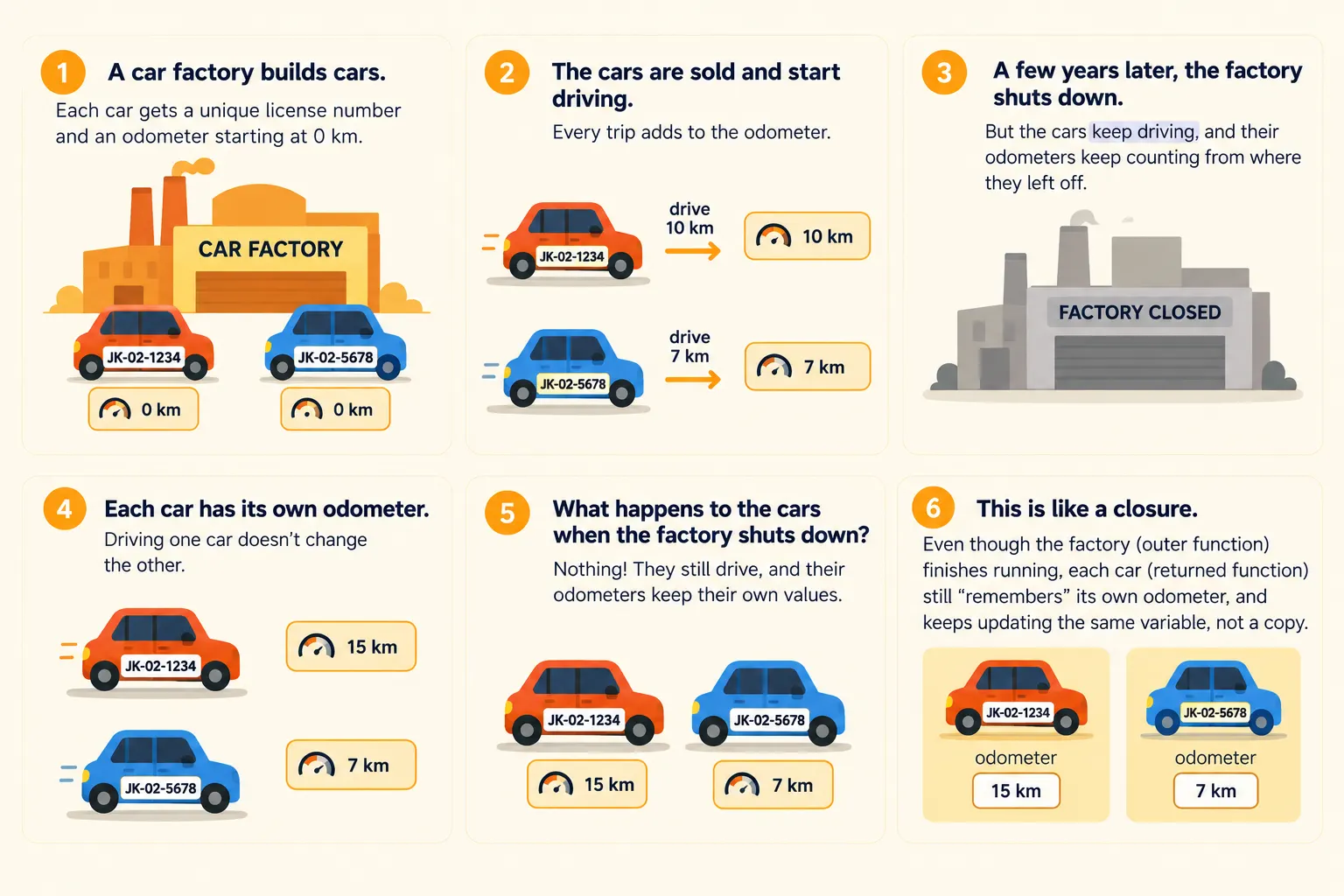
However, in reality, drive can still access odometer, and this is called a closure. The outer function did finish running, but since the inner function still needs the variable, JavaScript doesn’t throw it away. It keeps the variable itself alive in memory, not a copy of its value, which is why the odometer keeps counting from where it left off.
The same thing happened in our very first example. parent finished running, but p() could still access x, because the returned function still needed it.
What is a Closure?
Section titled “What is a Closure?”A closure is a function that keeps access to the variables from the place where it was written, even after that outer function has finished running.
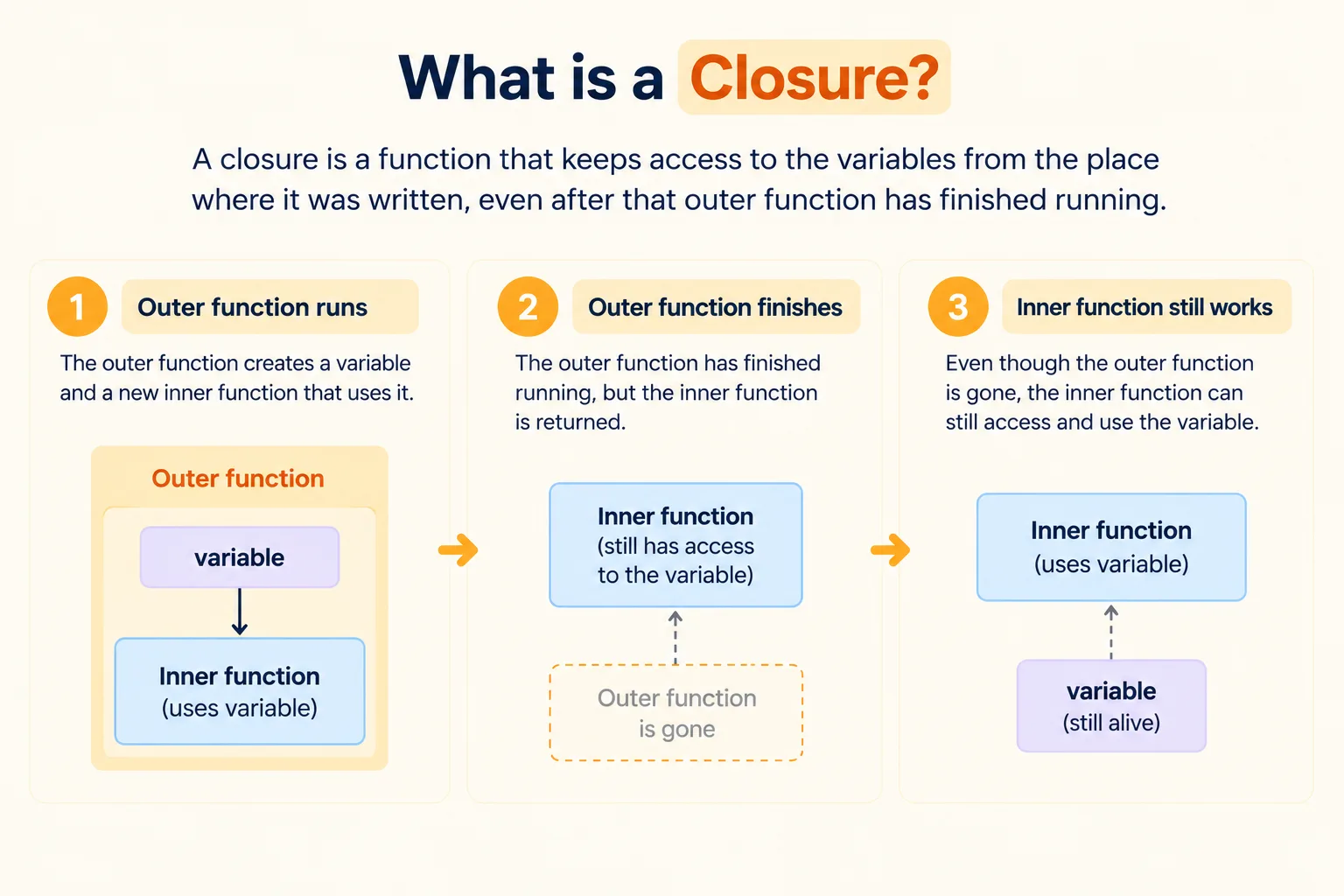
You’ve already seen two closures in this article:
driveis a closure. It keeps access toodometerandlicenseNumberfromcarFactory.- The function stored in
pis a closure. It keeps access toxfromparent.
Let’s look at one more simple example:
function makeGreeting(greeting) {
    return function (name) {
        console.log(`${greeting}, ${name}!`);
    };
}

const sayHello = makeGreeting("Hello");
const sayNamaste = makeGreeting("Namaste");

sayHello("Riya");   // Hello, Riya!
sayNamaste("Aman"); // Namaste, Aman!
In the above example, you can see that:
makeGreetingtakes agreetingand returns a function that takes aname.makeGreeting("Hello")finishes running, but the function it returns,sayHello, still remembers thatgreetingis"Hello".sayNamasteis a separate closure with its owngreeting, which is"Namaste".- When we call
sayHello("Riya"), it uses its rememberedgreetingalong with thenamewe pass in.
Cool! You now understand closures. Now you might be wondering: What are these even used for?
Uses of Closures
Section titled “Uses of Closures”Closures aren’t just a neat trick. You’ll find them all over real JavaScript code. Here are a few common uses:
1. Keeping data private
Section titled “1. Keeping data private”Variables inside a function can’t be reached from outside. With a closure, you can let other code use that data only in the ways you allow.
function createBankAccount() {
    let balance = 0;

    return {
        deposit(amount) {
            balance = balance + amount;
        },
        getBalance() {
            return balance;
        }
    };
}

const account = createBankAccount();
account.deposit(100);

console.log(account.getBalance()); // 100
console.log(account.balance);      // undefined
deposit and getBalance are closures over balance. Nobody can change balance directly; they have to go through deposit.
2. Creating custom functions
Section titled “2. Creating custom functions”You already saw this with makeGreeting. One function can create many similar functions, each remembering its own settings:
function multiplyBy(x) {
    return function (y) {
        return x * y;
    };
}

const double = multiplyBy(2);
const triple = multiplyBy(3);

console.log(double(5)); // 10
console.log(triple(5)); // 15
Remember multiplyBy from the Higher Order Functions article? It worked because of closures. double remembers x as 2, and triple remembers x as 3.
3. Remembering values in callbacks
Section titled “3. Remembering values in callbacks”When you pass a function to be called later, like with setTimeout, it still has access to the variables around it:
function greetAfterDelay(name) {
    setTimeout(function () {
        console.log(`Hello ${name}`);
    }, 1000);
}

greetAfterDelay("Riya"); // Hello Riya (after 1 second)
greetAfterDelay finishes running straight away, but the callback still remembers name when it runs a second later.
🧵 Wrapping It Up
Section titled “🧵 Wrapping It Up”Now you know why a function can still use variables from a function that has already finished running.
You learned how to:
- Understand what normally happens to a function’s variables once it finishes running
- Explain what a closure is
- Use closures to keep data private, create custom functions and remember values in callbacks
Whenever a function uses a variable from outside itself, it holds on to that variable for as long as it needs it. A closure is just a function that remembers where it came from.