Higher Order Functions
You’ve learned how to write functions, pass them arguments, and return values from them. But functions in JavaScript can do something more interesting: they can work with other functions.
Remember map(), filter(), and forEach() from the Arrays article? You passed a function into each of them and they used it to do their job. Those are Higher Order Functions, and you’ve been using them all along without knowing the name.
This article goes beyond normal functions and shows you what makes a function “higher order”, and how to write your own.
Analogy
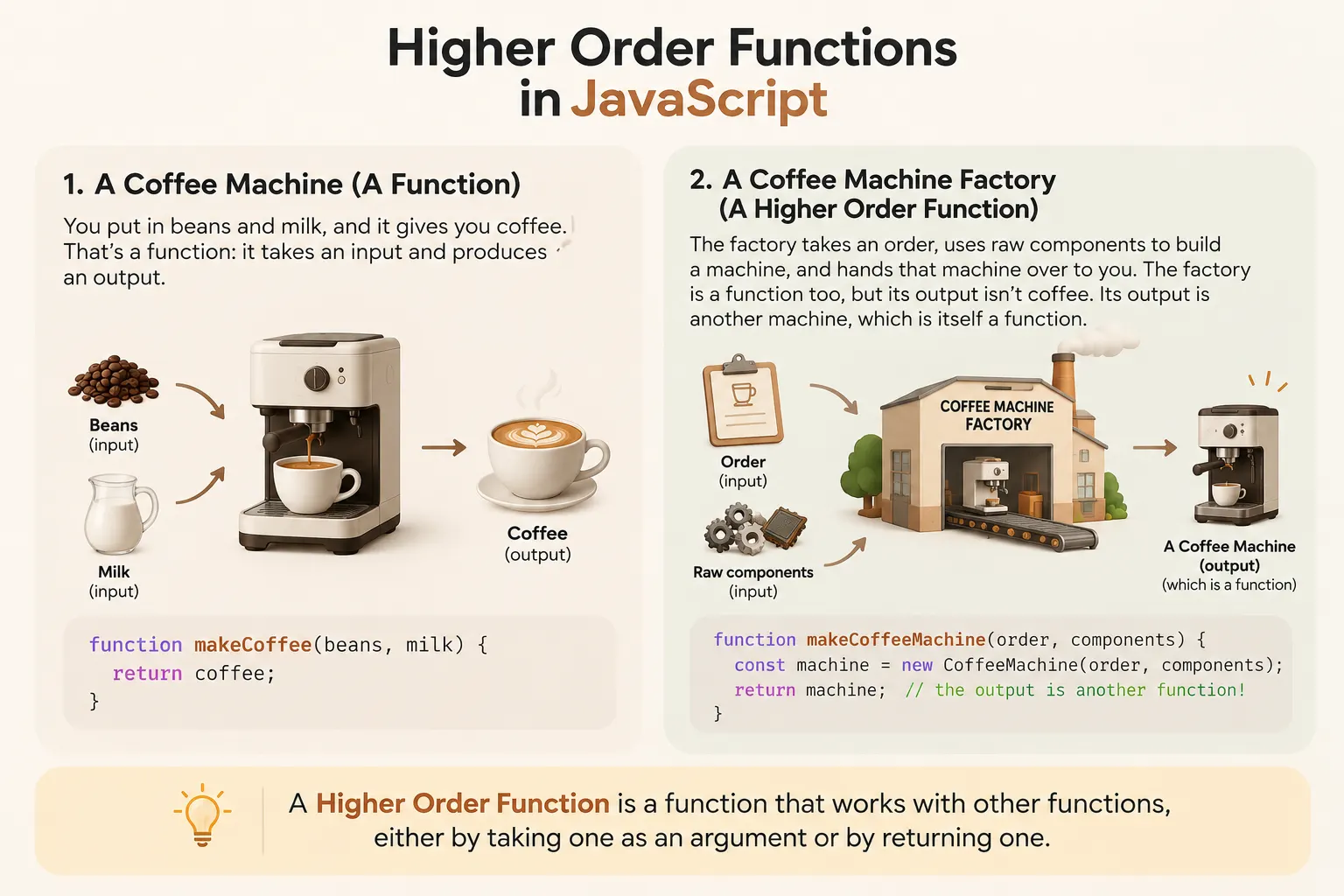
Section titled “Analogy”Think about a coffee machine. You put in beans and milk, and it gives you coffee. That’s a function: it takes an input and produces an output.
Now think about a coffee machine factory. It takes an order, uses raw components to build a machine, and hands that machine over to you. The factory is a function too, but its output isn’t coffee. Its output is another machine, which is itself a function.
So both the coffee machine and the factory behave like functions, but the factory works one level higher. It produces something that can produce things.
The same idea works in the other direction too. Imagine a coffee machine that lets you plug in your own grinder. The machine doesn’t care how the grinder works, it just uses whatever you hand it. That’s a function that takes another function.
What are Higher Order Functions?
Section titled “What are Higher Order Functions?”A higher order function (HOF) is a function that either takes a function as an argument or returns a function as output.
// Takes a function
function repeat(action) {
    action(); // calls the function the first time
    action(); // calls the function the second time
}

// Returns a function
function multiplyBy(x) {
    return function (y) {
        return x * y;
    };
}

repeat(() => console.log("Hello")); // outputs "Hello" twice

const double = multiplyBy(2);
console.log(double(5)); // outputs 10
In the above example you can see that:
- We have two higher order functions:
repeat()andmultiplyBy(). - The
repeat()function takes theaction()function and calls it two times. - The
multiplyBy(x)function takes a valuexand returns a function that itself takes a valueyand returns the multiplication result. - We call
repeat()and pass it a function that prints"Hello", so it prints twice. multiplyBy(2)returns a function, which we store in the variabledouble. Callingdouble(5)then runs that returned function withyas5, giving2 * 5.
What is a Callback?
Section titled “What is a Callback?”A callback is a function that you pass as an argument to another function, usually a Higher Order Function.
const performAction = (action) => action(); // calls the callback function

const result = performAction(() => 2 + 5);
console.log(result); // outputs 7

// Anonymous callback function passed to the HOF
performAction(() => {
    console.log("Hi I am callback function"); // outputs "Hi I am callback function"
});
In the above example you can see that:
- We have a HOF
performAction()that takes a callback functionaction. - The
action()function called insideperformAction()can be anything or any operation. - We passed a function that returns
2 + 5.performAction()returns that value, which we store inresultand print. - We reused
performAction()with a different callback, this time one that logs a message.
Passing Arguments to the Callback Functions
Section titled “Passing Arguments to the Callback Functions”Now that you’ve got the gist of HOFs, you might be wondering: how do we pass arguments to the callback itself?
Let’s look at an example:
const performAction = (action) => action();
const print = () => console.log("Hello world");

performAction(print); // outputs "Hello world"
In the above example, we created the print function and passed it as a callback to the performAction() HOF. However, the value in console.log is hardcoded. How can we pass any value to the print function itself?
Wrap the call in an arrow function
Section titled “Wrap the call in an arrow function”const performAction = (action) => action();
const print = (data) => console.log(data);
performAction(() => print("Hello World!")); // outputs "Hello World!"
performAction(() => print(22)); // outputs 22In the above example, we passed an anonymous callback function into performAction() that calls the print() function with the value we want to print.
Modify the HOF to accept arguments
Section titled “Modify the HOF to accept arguments”const performAction = (action, ...args) => action(...args);
const print = (data) => console.log(data);
performAction(print, "Hello World!"); // outputs "Hello World!"
performAction(print, 22); // outputs 22In the above example:
- We add another parameter to the HOF, a rest parameter
...args, and pass it into the callback asaction(...args). - Then we call
performAction()withprintas the first argument and the value to print as the second.
You’ve already used callbacks with map() and forEach(). In the next section, we’ll see how they work as Higher Order Functions.
Arrays Higher Order Functions
Section titled “Arrays Higher Order Functions”If you remember, at the start of the article we saw that we have already used higher order functions when we learned about arrays. In this section, we will not only discuss them but also write these higher order functions from scratch.
1. Map function
Section titled “1. Map function”The map() function iterates through each element in the array, transforms each one, and then returns a new array!
const fruits = ["apple", "banana", "mango"];
const capsFruits = fruits.map(fruit => fruit[0].toUpperCase() + fruit.slice(1));
console.log(capsFruits); // outputs ['Apple', 'Banana', 'Mango']
console.log(fruits); // outputs ['apple', 'banana', 'mango']
In the above example, we have a fruits array where each fruit has its name in all lowercase. We use map() to loop over each fruit in the array and capitalize the first letter.
Cool! I hope you haven’t forgotten this function. Now let’s make a few observations:
- The original
fruitsarray is not modified by themap()function. - The
map()function accepted a callback function, and ran it on every item in the array. - It applied the changes from the callback function to each item in the array.
Fine, now let’s write our own map() function:
function myMap(fn) {
    const result = [];
    for (let i = 0; i < this.length; i++) {
        const element = this[i];
        const res = fn(element);
        result.push(res);
    }
    return result;
}

Array.prototype.myMap = myMap; // assign this to the Array prototype object

const fruits = ["apple", "banana", "mango"];
const capsFruits = fruits.myMap(fruit => fruit[0].toUpperCase() + fruit.slice(1));
console.log(capsFruits); // outputs ['Apple', 'Banana', 'Mango']
console.log(fruits); // outputs ['apple', 'banana', 'mango']
In the above example, you can see that we created a myMap() HOF that takes a callback fn as an argument and then:
- Initializes an empty
resultarray. - Runs a loop on every element of the array and calls the
fncallback on eachelement. - Pushes each mapped element into the
resultarray. - Returns the
resultarray.
Let’s see how this flows when we call fruits.myMap(...) with our capitalize callback:
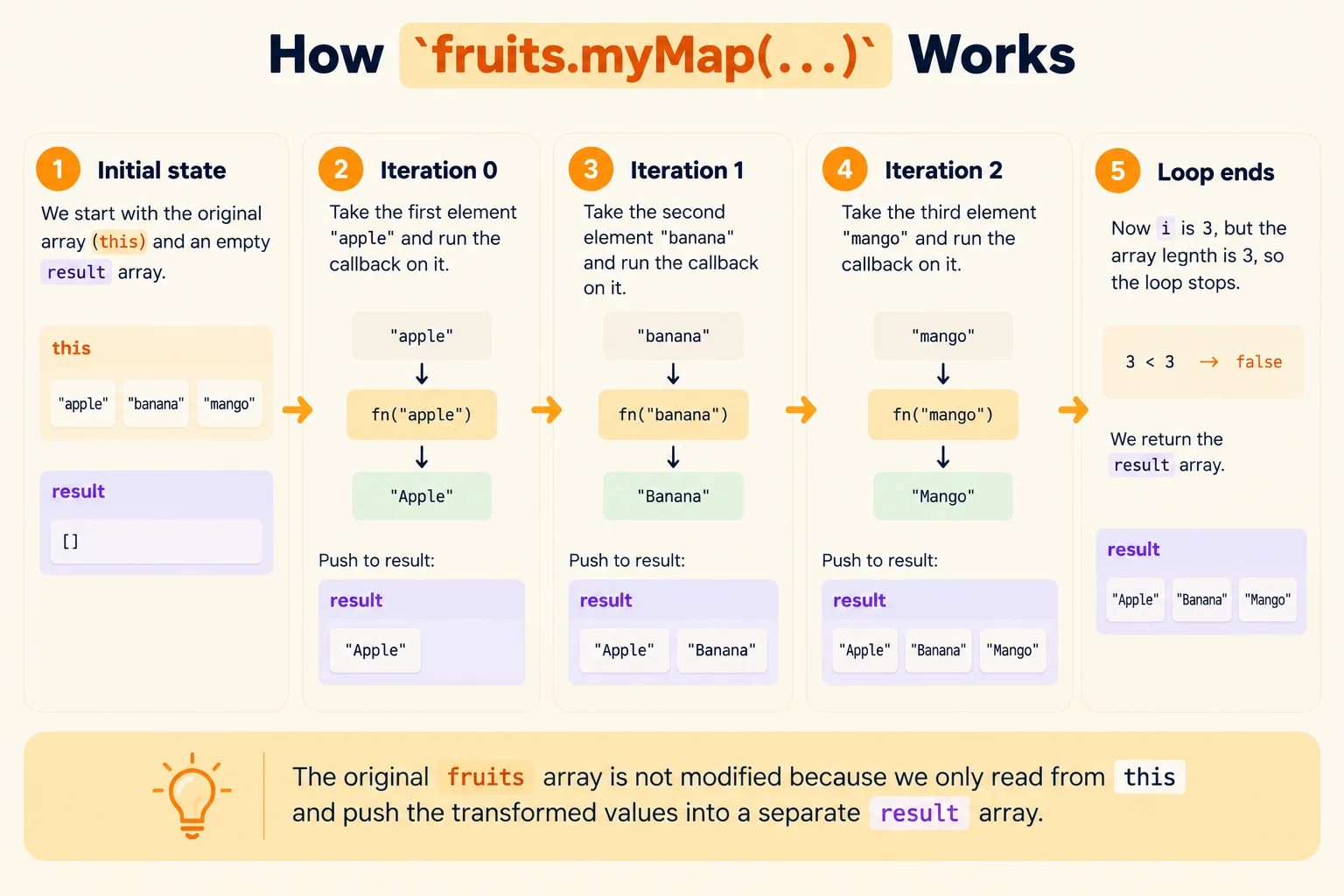
The original fruits array is untouched because we only read from this and push the new values into a separate result array.
2. forEach function
Section titled “2. forEach function”The forEach() function runs a callback once for every element in the array. Unlike map(), it doesn’t build a new array. It simply returns undefined, so it’s mostly used for side effects like printing values.
const fruits = ["apple", "banana", "mango"];
const result = fruits.forEach(fruit => console.log(fruit.toUpperCase()));
// outputs APPLE, BANANA and MANGO on separate lines
console.log(result); // outputs undefined
In the above example, we use forEach() to print every fruit in uppercase. Now let’s make a few observations:
- The
forEach()function accepted a callback function, and ran it on every item in the array. - It doesn’t return a new array. The value of
resultisundefined. - The callback is only there to do some work for each item, not to produce a new value.
Now let’s write our own forEach() function:
function myForEach(fn) {
    for (let i = 0; i < this.length; i++) {
        const element = this[i];
        fn(element);
    }
}

Array.prototype.myForEach = myForEach; // assign this to the Array prototype object

const fruits = ["apple", "banana", "mango"];
fruits.myForEach(fruit => console.log(fruit.toUpperCase()));
// outputs APPLE, BANANA and MANGO on separate lines
In the above example, you can see that we created a myForEach() HOF that takes a callback fn as an argument and then:
- Runs a loop on every element of the array.
- Calls the
fncallback on eachelement. - Returns nothing. There’s no
resultarray here, which is the main difference frommyMap().
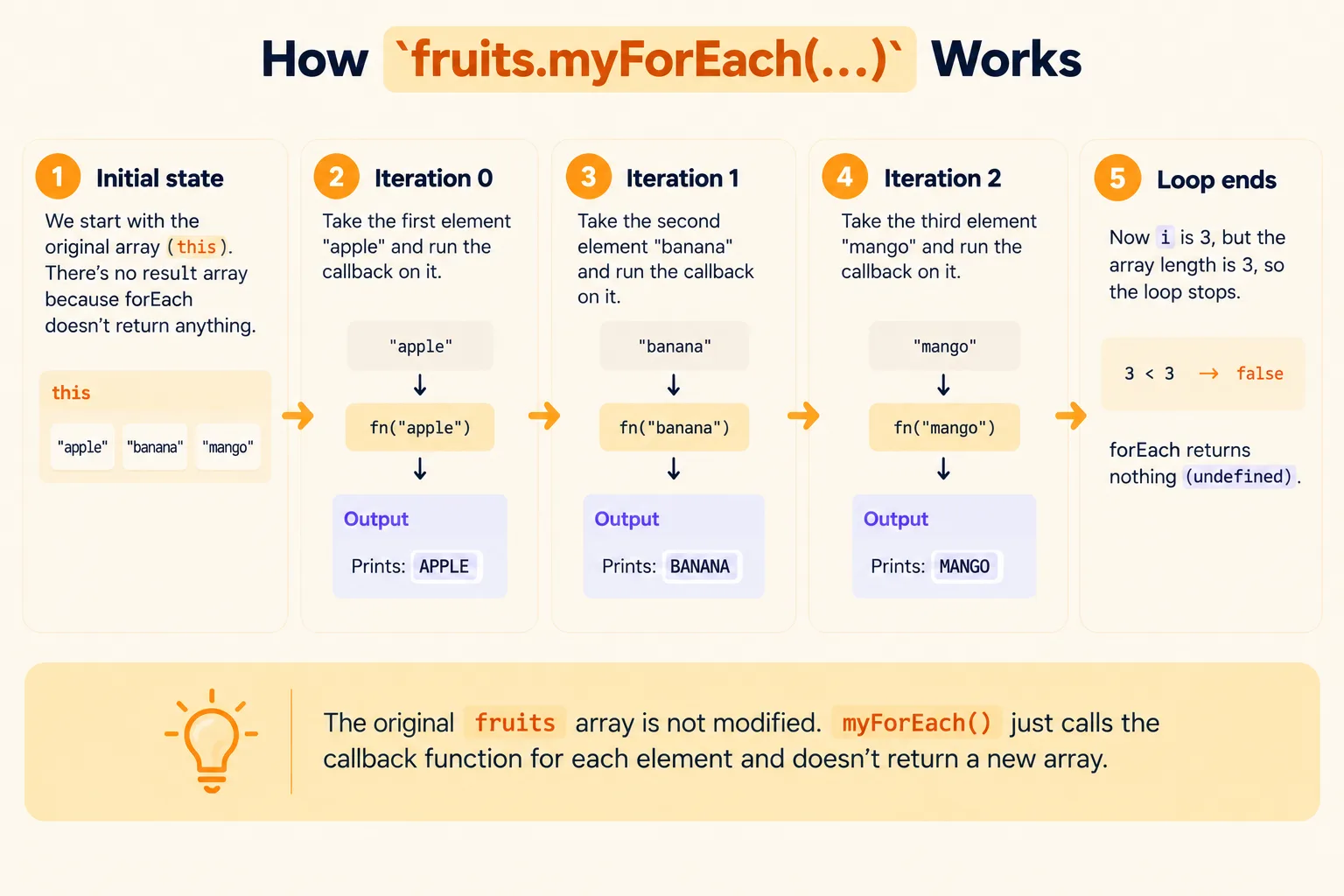
Let’s see how this flows when we call fruits.myForEach(...) with our printing callback:
3. Filter function
Section titled “3. Filter function”The filter() function runs a callback on every element and returns a new array containing only the elements for which the callback returned true.
const nums = [1, 2, 3, 4, 5, 6];
const evens = nums.filter(num => num % 2 === 0);
console.log(evens); // outputs [2, 4, 6]
console.log(nums); // outputs [1, 2, 3, 4, 5, 6]
In the above example, we have a nums array and we use filter() to keep only the even numbers. Now let’s make a few observations:
- The original
numsarray is not modified by thefilter()function. - The callback decides whether an item stays. It returns
trueto keep the item andfalseto drop it. - The new array contains the original items, not the values returned by the callback. This is different from
map().
Now let’s write our own filter() function:
function myFilter(fn) {
    const result = [];
    for (let i = 0; i < this.length; i++) {
        const element = this[i];
        if (fn(element)) {
            result.push(element);
        }
    }
    return result;
}

Array.prototype.myFilter = myFilter; // assign this to the Array prototype object

const nums = [1, 2, 3, 4, 5, 6];
const evens = nums.myFilter(num => num % 2 === 0);
console.log(evens); // outputs [2, 4, 6]
console.log(nums); // outputs [1, 2, 3, 4, 5, 6]
In the above example, you can see that we created a myFilter() HOF that takes a callback fn as an argument and then:
- Initializes an empty
resultarray. - Runs a loop on every element of the array and calls the
fncallback on eachelement. - If the callback returns
true, pushes the originalelementinto theresultarray. - Returns the
resultarray.
Let’s see how this flows when we call nums.myFilter(...) with our even number callback:
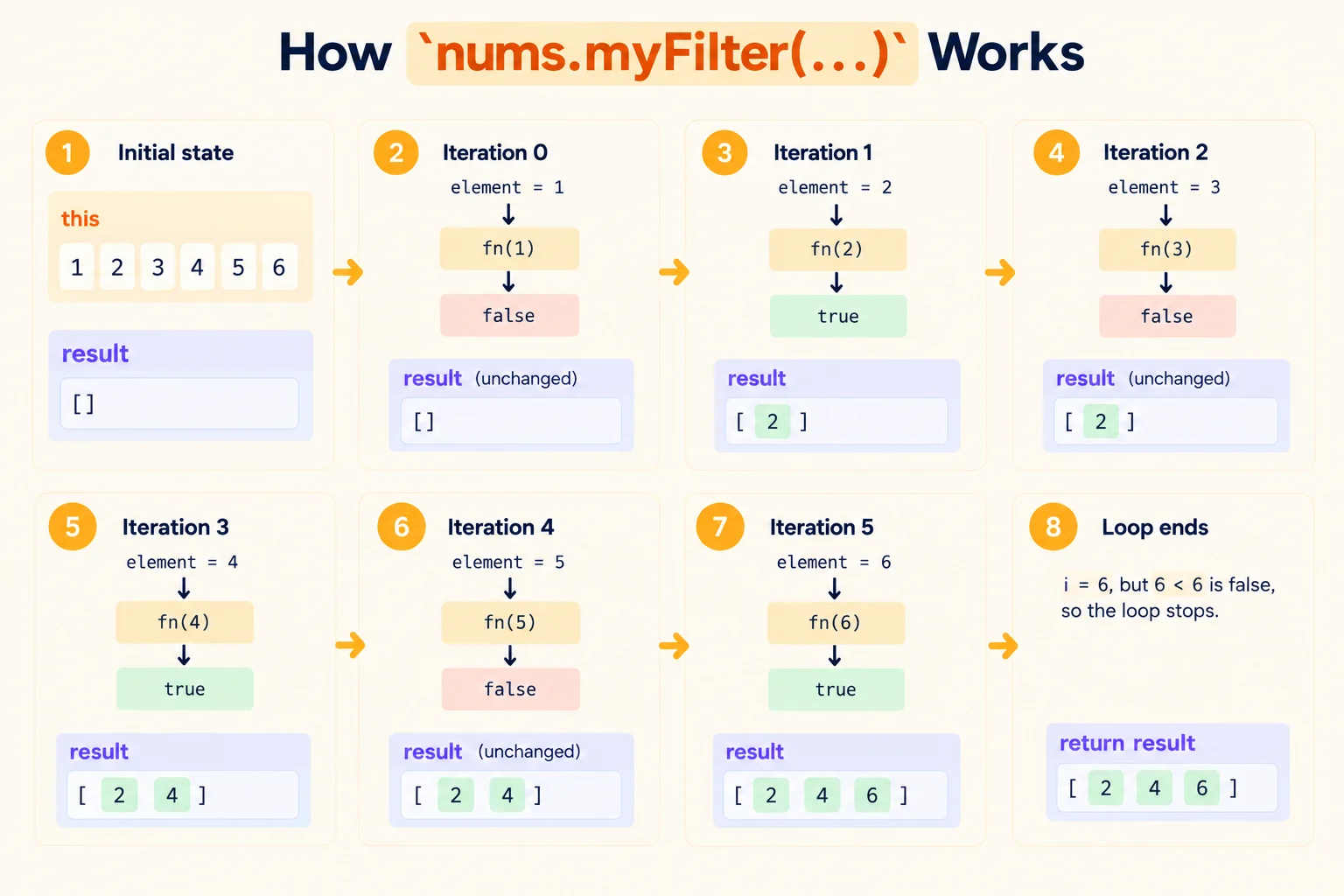
Notice the difference from myMap(). There, we pushed the value returned by the callback. Here, the callback only answers yes or no, and we push the original element.
🧵 Wrapping It Up
Section titled “🧵 Wrapping It Up”Now you know not only what Higher Order Functions are, but also how they behave in the array methods you already use: map(), forEach() and filter().
You learned how to:
- Explain what a Higher Order Function is
- Use callbacks, and pass arguments to them
- Write your own
map(),forEach()andfilter()from scratch
Remember to pass the function itself, not the result of calling it. A Higher Order Function is just a function that works with other functions.