Conditionals in JavaScript
So far, the code we’ve been writing has been pretty obedient almost too obedient. It just followed our instructions step-by-step without questioning anything.
But here’s the catch:
Real-world apps don’t work like that. Netflix doesn’t play a movie blindly. Amazon doesn’t let you check out without logging in. Your bank app doesn’t show your balance unless it verifies you are you.
Somewhere inside these apps, the code is doing something extremely simple yet incredibly powerful, It’s making decisions.
Let’s explore how.
Analogy
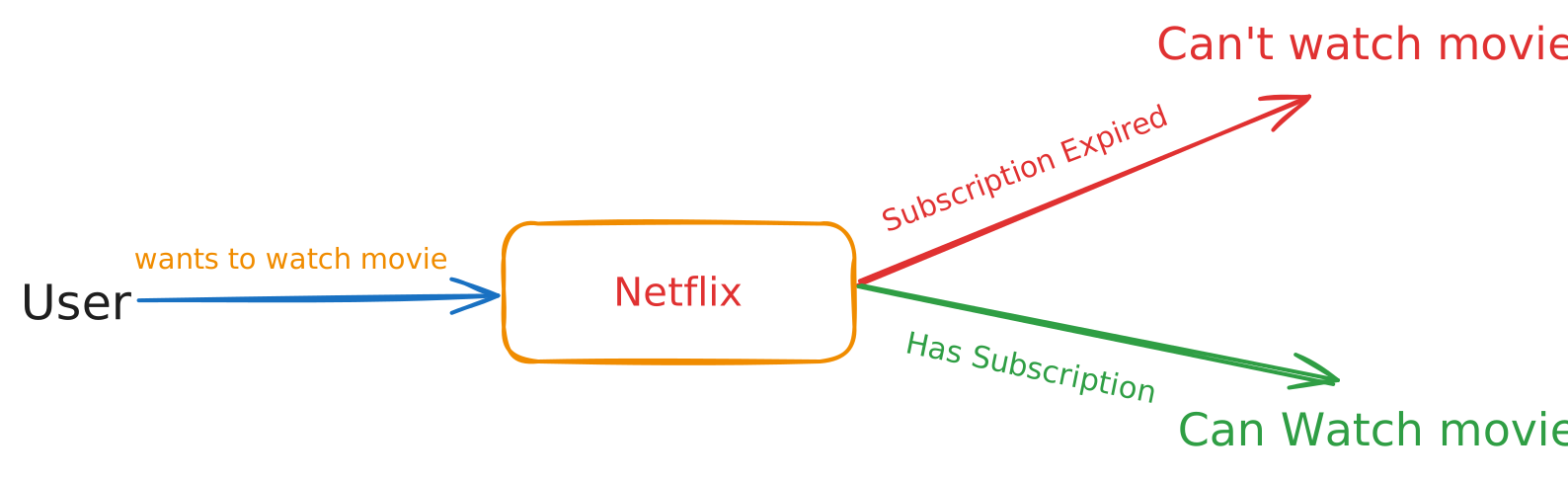
Section titled “Analogy”Imagine you’re trying to watch a movie on Netflix.
You tap on the movie and suddenly a popup appears:
“Your subscription has expired.”
You renew the subscription, tap the movie again, and now it plays instantly.
Did Netflix become smarter? Nope.
Under the hood, the logic is extremely dumb yet brutally effective:
Question: Does the user have an active subscription?
Answer: No
Action: Block access + show popup

Question (after renewal): Does the user have subscription?
Answer: Yes
Action: Play the movie
That’s it. One question. Two possible answers. Two different outcomes.
That tiny decision making ability is exactly what Conditionals bring to JavaScript.
What Are Conditionals?
Section titled “What Are Conditionals?”Conditionals allow your code to:
- Ask a question
- Evaluate whether it’s true or false
- Execute the relevant block of code
In simpler words Conditionals let your code take different paths based on different conditions.
Let’s start with the most basic one.
The if Statement
Section titled “The if Statement”The if statement is where JavaScript asks its first question.
if (condition) {
  // run this if condition is true
}
Here’s the simplest example to demonstrate an if condition:
if (true) {
  console.log("This will always run");
} // Outputs This will always run
Alright, Let’s plug this into our Netflix analogy.
const subscribed = true;

if (subscribed) {
  console.log("You can watch the movie");
} // Outputs You can watch the movie
If subscribed is true, the message prints.
If it’s false, nothing happens… which brings us to the next part.
The else Block
Section titled “The else Block”Life doesn’t always go the way we want. Same with code.
When the condition isn’t true, you might want a fallback.
if (subscribed) {
  console.log("You can watch the movie");
} else {
  console.log("Sorry, you can't watch the movie");
}
You see the flow?
- If condition is true, run the first block
- Otherwise, run the else block
This is your basic two path decision.
But what if you have more than two choices?
The else if Block
Section titled “The else if Block”Sometimes you don’t have just yes or no. You have ranges, levels, categories. For the multiple choices or conditions, we have the else if block.
Example: grading.
const marks = 77;

if (marks > 90) {
  console.log("You've got Grade A");
} else if (marks > 80) {
  console.log("You've got Grade B");
} else if (marks > 70) {
  console.log("You've got Grade C");
} else if (marks > 60) {
  console.log("You've got Grade D");
} else if (marks > 50) {
  console.log("You've got Grade E");
} else {
  console.log("You've got Grade F");
}
JavaScript checks these conditions top to bottom.
- The first condition that becomes true wins
- Remaining conditions are ignored
Note: else if is NOT multiple questions, it is one question with multiple possible answers.
Comparison Operators
Section titled “Comparison Operators”Until now, our conditions were simple values like true or false.
But real-world decisions need comparisons:
- Is age greater than 18?
- Are two passwords equal?
- Is cart total less than the minimum order amount?
Here are the operators that make these decisions work:
| Operator | Meaning |
|---|---|
> |
greater than |
< |
less than |
>= |
greater than or equal |
<= |
less than or equal |
=== |
strict equality |
!== |
strict inequality |
Example:
const age = 20;

if (age >= 18) {
  console.log("Allowed to vote");
} // Outputs Allowed to vote
These operators convert values into a boolean: either true or false.
Conditionals feed on booleans.
Logical Operators
Section titled “Logical Operators”Now things get interesting. Sometimes one condition isn’t enough. There might be a decision that required multiple conditions to be either true/false or one of them being true/false. This is where Logical Operators comes into picture.
Example: To watch a movie on Netflix you must:
- Be logged in
- Have an active subscription
Only if both the conditions are true, only then you can watch the movie.
&& (AND) Operator
Section titled “&& (AND) Operator”Runs only if both conditions are true.
if (isLoggedIn && hasSubscription) {
  console.log("Enjoy your movie!");
} // Outputs: 'Enjoy your movie!'
In above example, if the user is logged in i.e the value of the boolean variable isLoggedIn is true and user have an active subscription which is represented by the variable hasSubscription also evaluates to true, only then the code inside the if block will be executed.
|| (OR) Operator
Section titled “|| (OR) Operator”Runs if at least one condition is true.
if (isAdmin || isModerator) {
  console.log("You can remove the inactive user.");
} // Outputs: 'You can remove the inactive user.'
In above example, we have an if block with two conditions denoted by variables isAdmin and isModerator. Now let’s say that person wants to remove an Inactive user. So if either one of the condition is true, then the if block will be executed.
! (NOT) Operator
Section titled “! (NOT) Operator”This operator just flips the value. In other words, true becomes false and false becomes true.
console.log(!true); // Outputs: false
console.log(!false); // Outputs: true
In above example, the first line prints false, while the second one prints true. It’s like that game where you need to disagree with whatever the statement is being said.
if (!isLoggedIn) {
  console.log("Please log in first");
}
In the above code example, it checks isLoggedIn evaluates to false or not. If it does, then the user isn’t logged in and we print the message Please log in first.
Nested Conditionals
Section titled “Nested Conditionals”Nested Conditionals means a conditional block embedded inside another conditional block.
Example:
if (isLoggedIn) {
  if (hasSubscription) {
    console.log("Welcome to Prime Video!");
  }
}
In above example, the first if block evaluates if the isLoggedIn variable is true or not. If it evaluates to true, only then the internal or nested if block will execute. Now the nested if blocks check if the variable hasSubscription evaluates to true and only then the output will be printed on the screen.
Truthy and Falsy
Section titled “Truthy and Falsy”JavaScript doesn’t only evaluate booleans inside conditionals. It treats some values as truthy and some as falsy:
Falsy values
Section titled “Falsy values”These behave like false:
0""(empty string)nullundefinedNaNfalse(obviously)
Example:
if ("") {
  console.log("Runs?");
}
// doesn't run
if ("hello") {
console.log("Runs?");
}
// runsThis is where a big chunk of bugs originate. You’re now aware.
The switch Statement
Section titled “The switch Statement”So far, you’ve used if, else if, and else to handle multiple possibilities. That works… until it doesn’t.
A long else if chain quickly becomes:
- messy to read
- harder to maintain
- annoying to scale
That’s where the switch statement steps in.
Think of switch as a menu selector. You give it a value, and it jumps directly to the matching case.
When Should You Use switch?
Section titled “When Should You Use switch?”Use switch when:
- you’re comparing one variable against multiple fixed values
- all checks use strict equality (
===) - you want a cleaner alternative to many
else ifstatements
Example scenarios:
- mapping user roles
- handling commands
- responding to UI actions
- matching string values
Basic Syntax
Section titled “Basic Syntax”switch (expression) {
case value1:
// runs if expression === value1
break;
case value2:
// runs if expression === value2
break;
default:
// runs if nothing matches
}Every case needs a break, otherwise JavaScript continues to the next case a behavior called fall-through.
Let’s take an example of User Role Handling:
const role = "admin";

switch (role) {
  case "admin":
    console.log("You have full access");
    break;

  case "editor":
    console.log("You can edit content");
    break;

  case "viewer":
    console.log("You can view content only");
    break;

  default:
    console.log("Unknown role");
} // Outputs 'You have full access'
In above code example, as the value of the variable role is set to admin, hence the first case inside switch statement would match and the message you have full access will be printed to the terminal.
When NOT to Use switch
Section titled “When NOT to Use switch”Try to avoid switch when:
- your conditions involve ranges (if (age > 18))
- you need complex logic or multiple variables
- the value isn’t suitable for strict comparison
- the code becomes longer than an object based lookup
Hence, this covers most of the concepts required to understand conditionals in JavaScript
🧵 Wrapping It Up
Section titled “🧵 Wrapping It Up”Conditionals are the decision makers of JavaScript and one of thr most fundamental concept of programming.
You learned how to:
- Use
if,else,else if - Compare values using comparison operators
- Combine checks using logical operators
- Build complex decision flows
- Avoid common pitfalls with truthy/falsy
- Write cleaner, more maintainable logic